Railway Chart Vacancy – Check Train Chart Vacancy, Reservation Chart With Name Online
The Railway Vacancy Chart (also called Chart Vacancy) is an official document published by Indian Railways showing the list of empty berths on a train after Reservation Chart Preparation. Understanding the Vacancy Chart helps you grab confirmed seats at the last minute.
Chart vacancy refers to the seats or berths that remain empty on a train after Indian Railways prepares its reservation chart. These vacancies happen for a simple reason: passengers cancel their tickets, or simply don’t show up, and the berths they’d booked are left unclaimed. Once the chart for a train is published, that empty inventory becomes available again — for waitlisted passengers to move up, for RAC passengers to get upgraded to a full berth, and for fresh current bookings at the counter or online.
In short: it is the gap between how many berths were booked and how many people actually travelled.

Train Chart Vacancy
These are the seats or berths still free on a train once the Indian Railways reservation chart has been prepared. They come from passengers who cancel, passengers who do not turn up, and reserved quota seats that go unused. Knowing about them helps you judge whether a confirmed seat may still be possible before the train departs.
If seats remain vacant after accommodating eligible RAC passengers, they may become available through Current Booking, allowing passengers to book confirmed tickets before departure, subject to availability.
- Ticket Booking: Passengers book train tickets through online or offline reservation systems. Tickets may be Confirmed, RAC (Reservation Against Cancellation), or Waitlisted.
- Reservation Chart Preparation: Before the train departs, Indian Railways prepares the reservation chart. This chart contains the final list of passengers and their allotted seats or berths.
- Creation of Chart Vacancies: After the chart is prepared, some seats may remain vacant due to:
- Ticket cancellations
- No-show passengers
- Unused quota seats
- Last-minute changes in reservations
- Current Booking
Types of Chart Vacancy Status
Available (AVL)
Confirmed seats are vacant. You can book at the Current Counter immediately.
RAC
Reservation Against Cancellation — seat shared until full berth opens from cancellations.
Waitlist (WL)
No confirmed berth. Confirmation depends on upstream cancellations before departure.
Current Booking (CK)
Train chart prepared. Only current counter bookings allowed at the station now.
How to Check IRCTC Chart Vacancy Online
Enter your train, boarding and destination stations, journey date and class. The checker asks the railway reservation system how many berths are still unsold in that class for that journey — the figure that decides whether seats will be released when the chart is prepared — and shows it alongside the next few dates. The coach-by-coach vacancy list itself is published only on the official IRCTC charts page, and every result links straight to it.
Reservation Chart Vacancy: What Happens After Chart Preparation?
After the reservation chart is published (about 10 hours before departure), Indian Railways opens all empty berths for current booking at station counters. Here's the priority order:
- RAC passengers get confirmed berths first from the vacancy chart
- Waitlist passengers with low WL numbers get confirmed next
- Remaining vacant berths are available for fresh current-counter booking
Use our Chart Vacancy Checker to check train vacancy chart status for any reserved Indian Railways train — it shows the current availability for your class and date, based on the railway reservation system.
How and When Chart Vacancy Is Created
Indian Railways runs a two-stage charting process, and vacancy appears at both stages:
- First Chart — prepared roughly 8 hours before departure (by around 9:00 PM the previous night, for trains leaving between 5 AM and 2 PM). This is when the bulk of cancellations get processed and the first wave of vacant berths appears.
- Final Chart — prepared 30 minutes before departure, capturing last-minute cancellations and no-shows. This is the last official update before the train leaves.
Between these two points, and even after the final chart, a TTE onboard can still allot any berth that opens up right before or during the journey.
Reservation Chart Vacancy vs Reservation Chart: What’s the Difference?
These terms get used interchangeably, but they aren’t quite the same thing:
| Term | What It Shows |
|---|---|
| Reservation Chart | The complete passenger list — every Confirmed, RAC, and Waitlisted traveller with their berth details |
| Chart Vacancy / Vacancy Chart | Just the leftover, unbooked berths after that reservation chart is finalized |
So when people search for it, they usually want one of two things: either confirmation that their own seat has cleared, or a look at which berths are still open so they can grab one.
How to Check Chart Vacancy on our website withs step by step
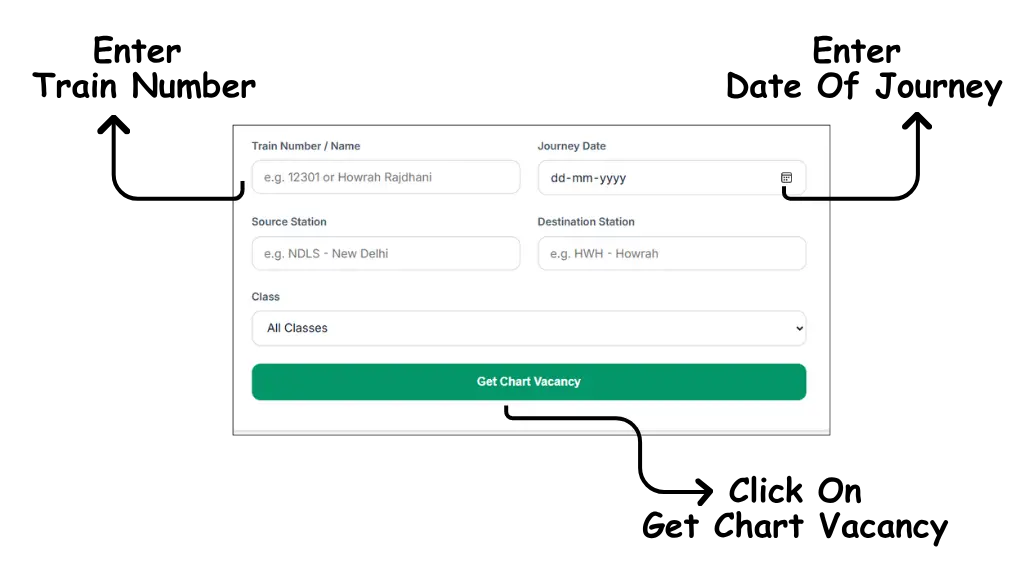
Checking it here takes under a minute. Follow these steps:
- Enter Train Number: Type your 5-digit train number or train name in the first input box (e.g., 12301 or Howrah Rajdhani).
- Select Journey Date: Choose your date of travel from the calendar.
- Enter Your Stations: Pick your boarding and destination stations from the suggestions. Availability is sold per journey, so the railway system needs both.
- Search: Click the "Get Chart Vacancy" button.
- Read the Result: See how many berths are still free in your class on your date — and on the next few dates — without logging in. For the coach-by-coach list, follow the link to the official IRCTC chart.
Check Seat Availability after chart vacancy prepared
Once you search, the result has four parts:
- Train and journey: the train number and name, your date and the route you searched. Check these first so you know you are looking at the right service.
- Current availability: the figure from the reservation system for your class — for example AVAILABLE 45, RAC 12 or WL 30 — with a plain-English note on what it means for your journey.
- Nearby dates: the same class on the next few days, so you can see at a glance whether moving your trip by a day would help.
- Berth-by-berth chart: the coach-wise vacancy list is published by Indian Railways itself once the chart is prepared. We do not reproduce it; the button takes you to the official IRCTC charts page.
Why Chart Vacancy Matters If You’re Waitlisted or RAC
If your ticket is waitlisted, checking train vacancy chart data tells you two things at once:
- Whether you’ve moved up — waitlisted passengers advance in order as confirmed passengers cancel
- What’s still open — if you haven’t moved up yet, you can see whether berths are still free and book them through Current Booking before the final chart closes the window
This is especially useful on long-distance or high-demand routes, where waitlists can be long but cancellation rates are also high closer to departure — a berth that looked impossible the day before can open up hours before the train leaves.
Booking a Vacant Berth: Your Options
Once you’ve spotted an empty seat on the train chart, you have two ways to claim it:
- Current Booking online — available right up until the final chart is prepared, through IRCTC or a linked booking platform
- At the station counter or via the TTE — even after the final chart, if a seat is confirmed to be empty, the TTE can allot it onboard, usually against a small current-booking charge
Keep in mind current booking is first-come-first-served, so acting the moment you see a vacancy matters more than waiting for a “better” berth to appear.
Frequently Asked Questions
Answers to the most common questions about vacant berths and seat availability.
Chart vacancy refers to the empty or unoccupied seats/berths that remain available after the Indian Railways prepares the final passenger reservation chart for a train. When passengers cancel their tickets or don't show up, those seats become chart vacancies. These vacant berths can be booked at the station's Current Booking counter after chart preparation.
Indian Railways prepares the first reservation chart about 10 hours before the train's scheduled departure. For trains originating from a major station (starting point), the chart is usually prepared at 8 PM the night before the departure date. For intermediate stations, the chart may be prepared closer to departure time.
Yes! After chart preparation, you can book tickets at the Current Booking counter at the station. These are called "Current Counter Tickets" or "CC Tickets." You can also use the IRCTC website or app to check availability, but current booking after chart preparation is typically done at the station only.
You can check vacant seats after chart preparation through several methods: 1) Use ChartVacancy.in's Chart Vacancy Checker tool. 2) Visit the IRCTC website and check seat availability. 3) Visit the station's inquiry counter. 4) Check the physical chart posted on the train coaches. The chart is usually posted 30-60 minutes before departure.
Vacancy data updates periodically as cancellations and new bookings occur. After the initial chart is prepared, updates happen as passengers cancel their tickets. Our platform syncs data regularly to provide the most accurate vacancy information. However, for the most current information, always verify at the station counter before boarding.
RAC (Reservation Against Cancellation) confirmation chances depend on several factors: 1) Train popularity — less popular trains have higher chances. 2) Journey date — off-peak dates have better chances. 3) Your RAC number — lower RAC numbers confirm first. 4) Cancellations — more cancellations mean higher confirmation chances. Generally, RAC 1-5 have very high confirmation chances (80-90%), while RAC 10+ has moderate chances (40-60%).
A vacancy chart and chart vacancy refer to the same concept — the list of empty berths/seats in a train after the reservation chart is prepared. The vacancy chart shows coach-wise and berth-wise information about which seats are unoccupied. Indian Railways publishes it online on the IRCTC charts page, and it is also pasted on coach doors at the station. ChartVacancy.in shows the class-wise availability behind it and links to the official chart.
To check reservation chart vacancy for your train: 1) Enter your train number or name (e.g., 12301). 2) Pick your boarding and destination stations. 3) Select your journey date and class. 4) Click "Get Chart Vacancy" to see the current availability for that class and the next few dates. For the coach-by-coach list, open the official IRCTC chart from the result.
To check chart vacancy for a specific train, use the checker above: enter the train number or name, your stations, the journey date and your class (1A, 2A, 3A, Sleeper and so on). It shows whether that class is available, on RAC or waitlisted, and how the next few dates compare. On busy trains such as the Rajdhani, Duronto or Shatabdi, check again once the first chart is prepared — about 10 hours before departure, or by 8 pm the previous night for morning trains.
The full reservation chart contains the complete passenger list with names and exact berth details. While you cannot view the entire passenger list online due to privacy reasons, you can use a PNR status checker to see your specific booking on the reservation chart. If you only want to know which seats are empty, check the availability for your class instead.
Check Live Chart Vacancy Now
Don’t wait until you’re at the station to find out what’s open. Check the availability on your train right now — free, and no login needed.